What players see
This page describes the HUD, GroundZero's default display. Your missions can show in Fortnite's Quests tab instead: see Where missions show. Progress and resets work the same either way.
On screen
All of it shares one look: dark cards, white titles, grey details and thin progress bars in your island's colour (acid yellow #E8FF3A unless you change it). Finished missions show Done in mint.
-
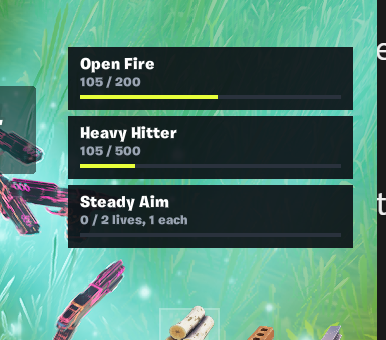
Pinned missions on the right of the screen, below the minimap: the next few missions with a progress bar.
-
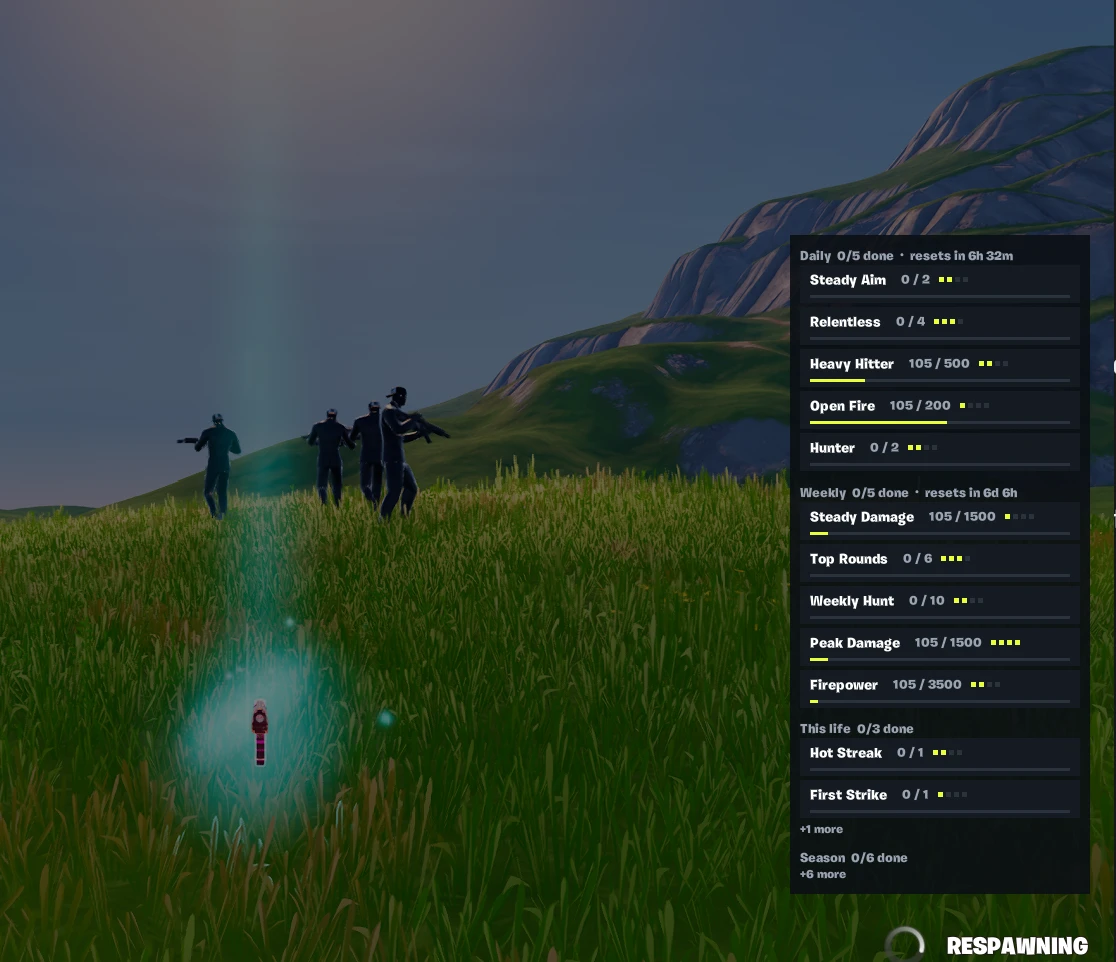
The full list when a player joins (for a few seconds) and while they are eliminated, in groups:
- Daily: new missions every day, with the time left before they reset;
- Weekly: new missions every week;
- This life: short missions for the current life, when a season has them. Seasons made by GroundZero don't include them for now: goals for a single life are daily missions ("3 eliminations in a single life");
- Season: the long goals for the whole season.
The list shows at most Max List Rows missions (12 unless you change it), unfinished ones first, so it fits any screen. Groups that don't fit show "+N more". It fills from the top: with many dailies and weeklies, the later groups may show only their count. That's a choice you can change (below).
-
A short message at the top when a mission is done.

Progress
- Progress is saved per player on Fortnite's servers and kept between visits. If a player leaves mid-life, at most the last few seconds don't count.
- Daily missions reset at 00:00 UTC; weekly missions on Mondays at 00:00 UTC. Missions a player finished stay done until then.
- Each player gets their own missions. A season serves a few at a time (for example 5 daily and 5 weekly) and rotates them on schedule.
- A season starts the day it's made for your island and is live as soon as you publish. It has no end date: after its length it loops (or ends, if you choose). Changing the season means publishing an island update; player progress carries over for missions that stay the same.
Changing the look
On the season device (select it in your level, then Details):
| Setting | What it changes |
|---|---|
| Pinned Count | How many missions are pinned on screen (0 hides them) |
| Accent Hex | Your island's colour for progress bars, tier marks and the message headline. Default acid yellow #E8FF3A |
| Pinned Top, Pinned Right Margin | Where the pinned missions sit |
| Show Toasts, Toast Seconds | The "mission done" message |
| Show List On Respawn, Join List Seconds | The full list while eliminated, and for how long on joining (0 = not on joining) |
| Max List Rows | The most missions the full list shows at once (default 12). Lower it for a shorter list |
| Bar Width, List Bar Width | Width of the pinned cards' and the list's progress bars (both 260 by default, so the cards and the list line up) |
| Season Days | How long the season runs, in days. 0 = the season's own length (usually 28) |
| After Season | What happens once the season has run that long. Loop (default): it starts again from day 1, so your island never runs out of missions while you make the next season. End: no more missions, and players see one card: "Season complete · New missions coming soon" |
| Debug Log | Turn off before publishing: it prints GroundZero's working notes in test sessions |
| Debug Day Offset | Test only: moves the season's clock forward N days, so you can see later days' missions, rotation and resets. Set it back to 0 before publishing |
The HUD is a starting point. Its look, what it pins and how the list fills are yours to change: with the settings above, or by drawing your own screens from GroundZero's mission data. See Your own mission UI. When you use your own screens, set the settings above so GroundZero's default display is off.