Install the add-on
About 10 minutes. You copy one folder into your island, turn on two settings and reopen the project. Then the GroundZero panel opens by itself and walks you through the rest (Quickstart).
Before you start
| You need | Notes |
|---|---|
| Windows and UEFN 43.00 | The add-on is tested on 43.00. Older versions aren't supported. |
| An island project | Try it on a copy or a test island first, not an island players are on. |
| The GroundZero add-on zip | Ask for access at devrel@groundzero.games. Coming: a download page. |
| Python allowed on your account | UEFN's project Python is a beta that Epic enables per account. If Project Settings > Beta Access has no Python setting, see Troubleshooting. |
You don't need a season pack to install. Your season is built from your island's scan, which comes later.
What's in the zip
| Folder | What it is | What you do with it |
|---|---|---|
Content | The add-on, exactly as it goes into your island (Content\Python\groundzero and Content\Python\init_unreal.py). | Copy it into your island (step 1). |
(inside it) Content\Python\groundzero\payload\sdk | The Quest SDK. Its files end in .verse.txt so UEFN doesn't build them before you choose to install them. | Nothing. Install SDK in the panel copies it into Content\GroundZero as .verse files and builds. |
Updater | Run GroundZero Updater: updates every island on this PC while UEFN is closed. Signed by ChaosGround Holdings LTD. | Keep it. Use it when we tell you an update is ready (Keeping GroundZero up to date). |
INSTALL.txt | A short version of this page. | Read it if you're offline. |
1. Copy the add-on into your island
- Close your project in UEFN (or close UEFN).
- Unzip the download anywhere, for example your Desktop.
- Open your island's project folder:
Documents\Fortnite Projects\<your island>\. It's the folder with your island's.uefnprojectfile in it. - Copy the
Contentfolder from the zip into that folder. Windows merges it with your island's ownContentfolder. If it asks about files with the same names, those are GroundZero's files from an earlier version: choose Replace the files in the destination. It only addsContent\Python\groundzeroandContent\Python\init_unreal.py; none of your files change.
Already using Python in this island? If your island already has its own
Content\Python\init_unreal.py, don't replace it. Copy onlyContent\Python\groundzero, then add these two lines to the end of your owninit_unreal.py:
Check: your project folder now has Content\Python\groundzero\ (a folder with about 40 files, some in subfolders) and Content\Python\init_unreal.py.
2. Open the project and allow the add-on
- Open the project in UEFN.
- UEFN may ask "Auto run this project's Python scripts?". Choose Allow. This is what lets the add-on run in this project. You can change it later in Tools > Python.
UEFN only asks this once per project. If you chose Deny by mistake, turn it back on in Tools > Python.
Nothing from GroundZero shows yet, and that's expected. No panel, and
gz()does nothing. The add-on only starts when the project opens with the two settings below turned on. On a new island they're off.
3. Turn on two settings (once per island)
- Project Settings > Beta Access > Enable Project Python scripts: on.
- Project Settings > MCP Toolsets (beta): on. These are Epic's editor tools. GroundZero uses them to build your Verse, place the season device, connect your devices and read your island, only inside your editor on your PC.
- Close and reopen the project. Both settings only take effect after a reopen. This reopen is when GroundZero starts for the first time.
4. What you'll see when it opens
In order, within about a minute:
- UEFN opens your level as usual. GroundZero never blocks the editor from opening.
- The GroundZero panel opens by itself, docked to UEFN. At first it says Reading your island while UEFN finishes loading your level and its editor tools.
- The panel then shows Set up GroundZero with a checklist. The first step, Allow the add-on, is already ticked. The top right says Not signed in: that's expected. Installing doesn't need an account; you sign in later, when you send your island to GroundZero.
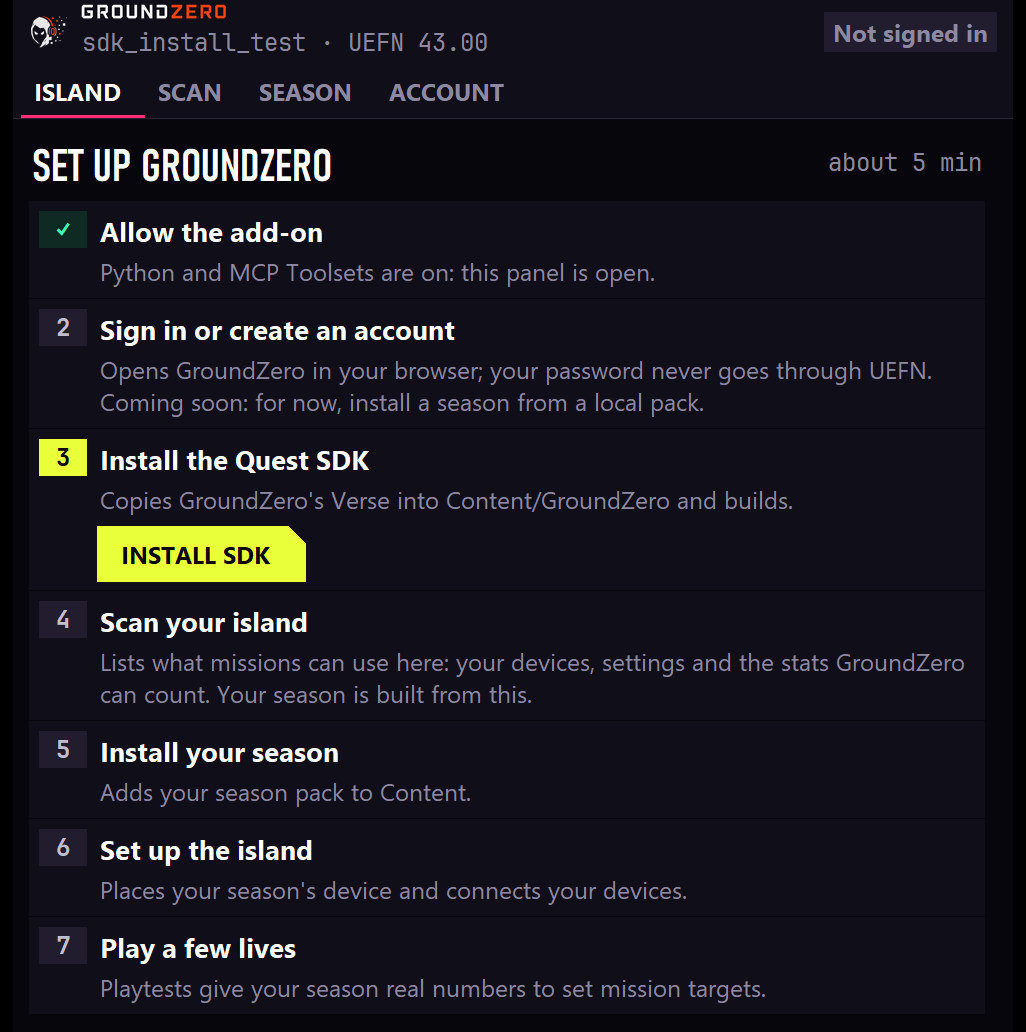
You're installed when the panel shows that checklist. Carry on with the Quickstart, step 4: Install SDK, Scan island, get your season from GroundZero, Set up island.
Closed the panel? Type gz() in UEFN's Python bar at the bottom of the editor to open it again.
If something isn't right
| What you see | What it means | What to do |
|---|---|---|
gz() does nothing | The add-on hasn't started: the project hasn't been reopened since the files were copied in and both settings turned on | Do step 3 (both settings on, then close and reopen). gz() only exists once the add-on has started. |
| No panel, no prompt | UEFN didn't run the add-on | Check step 1's Check, then that Enable Project Python scripts is on, and reopen. Then type gz(). More in Troubleshooting. |
| The panel says One setting to turn on | MCP Toolsets is off | Turn on Project Settings > MCP Toolsets (beta), close and reopen the project. |
| The panel says GroundZero needs an update | Fortnite updated and this add-on version can't reach its editor tools | Get the latest add-on from GroundZero and copy it in as in step 1. |
| The panel stays on Reading your island | UEFN is still loading | Give it a minute, then close and reopen the project. |
| No Python setting in Beta Access | Python isn't enabled on your account | Tell GroundZero. |
Where GroundZero keeps things
| What | Where | Shared |
|---|---|---|
| The add-on | <your island>\Content\Python\ | with the island (and with teammates who sync it) |
| The Quest SDK and your season | <your island>\Content\GroundZero\ and <your island>\Content\ | with the island |
| Your island's scan and playtest numbers | <your island>\Saved\GroundZero\ | this PC only |
| Season packs, downloaded updates, removal backups | Documents\GroundZero\ (Packs, Updates, Removed) | this PC, all your islands |
| Your GroundZero sign-in | your Windows user folder, never in the island | this PC |
Documents means the Documents folder you see in File Explorer. If OneDrive backs it up, that's OneDrive\Documents.
Next
- Quickstart: set up GroundZero in your island.
- Keeping GroundZero up to date · Removing GroundZero · Versions